Craft Pro Mini Exploration
SentGamesTrivia
3.94.00 Reviews
- Version
- 2.25
- Installs
- 100.00K
- Age Rating
- Everyone
Screenshots
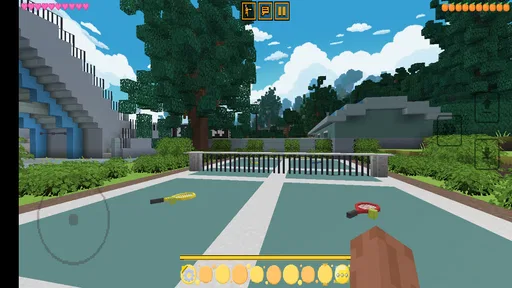
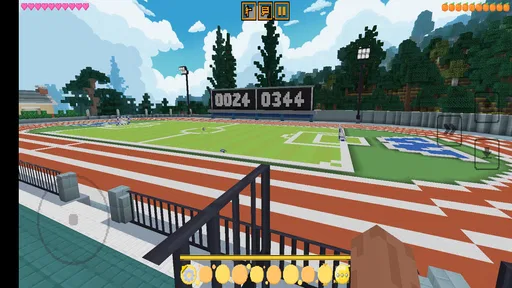
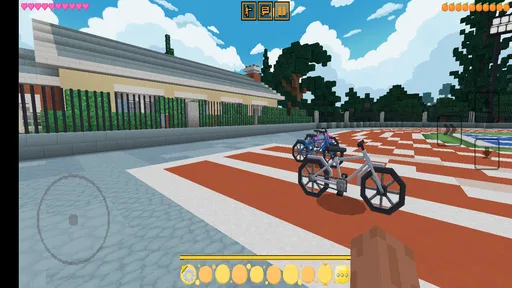
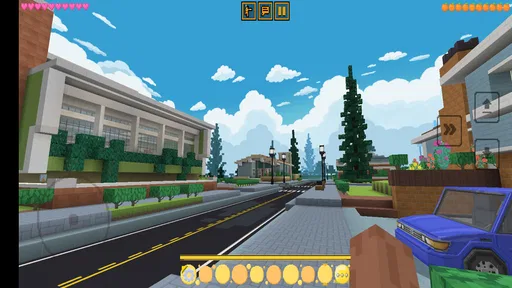
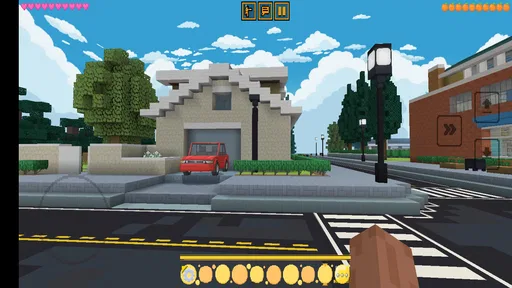
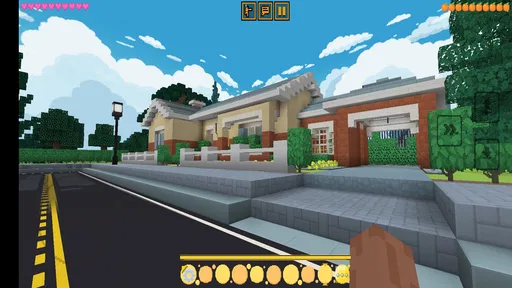
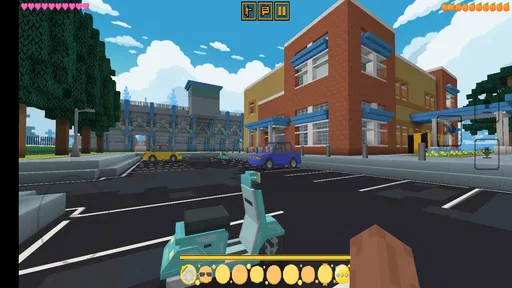
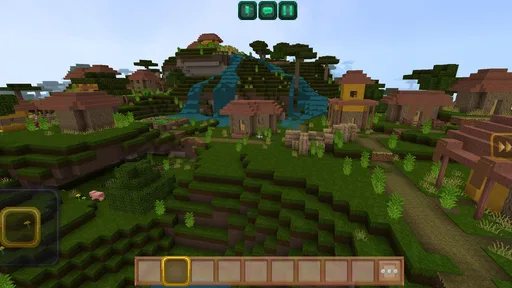
Our Review of Craft Pro Mini Exploration
 Analysis by Appyee
I spent time with Craft Pro Mini Exploration as a small, casual 3D sandbox game rather than treating it like a full replacement for a large, established building game. That distinction matters. Its appeal is easy to understand: you can open a free trivia-category title from SentGames, enter a block-based world, and experiment without first committing to a complicated long-term project. I found it most interesting when used in short sessions, especially on a shared phone or tablet where different people may take turns exploring.
The game has a 3.9 average from around 680 ratings and has passed 100K installs. Those figures suggest that it has found a modest audience, although they also tell me to keep expectations sensible. This is not the kind of release I would recommend automatically to someone looking for the depth of a premium sandbox classic. I would recommend trying it when the priority is simple 3D exploration, creative tinkering, and an approachable experience suitable for an Everyone audience.
How it works when a household shares one device
The most practical way to approach this game is to treat it as a shared activity, not as a private account-based hobby. Imagine a child using a family tablet after school, then handing it to a sibling or parent later in the evening. One person may want to build a small shelter, another may simply want to look around, and a third may be curious about the basic controls. That kind of handoff is where the compact idea behind the game makes sense.
I would begin by giving each player a clear turn and a simple goal. One session could be about finding a comfortable place to build, while the next could focus on changing the surroundings or testing how the world responds. Without a written plan, shared sandbox play can quickly become frustrating: one player changes something that another person considered “theirs,” and nobody remembers what was intended. The game is more enjoyable when the household agrees on the purpose of each session before passing over the device.
There is also a useful difference between watching and playing. A younger player may learn the controls by observing an older sibling, while an adult can help with the first few minutes without taking over the entire experience. I found that this makes the title more suitable for relaxed cooperation than for competitive play. It gives people something to discuss and demonstrate, even when they are not playing simultaneously.
That said, I would not assume that the game itself manages separate household identities. A shared device should therefore be treated as a shared space unless the platform or the family has another arrangement. If preserving individual progress is important, the safest habit is to agree on who is using the current world and avoid making changes during somebody else’s turn. This is less convenient than having clearly separated profiles, but it prevents many avoidable arguments.
Setting expectations before the first session
My first recommendation is to decide what “success” means before opening the game. If the player expects a huge progression system, a carefully guided campaign, or the same range of options found in a major sandbox franchise, disappointment is likely. The store summary presents it as an interesting 3D sandbox game, and that is the right mental starting point: a place for experimentation rather than a promise of an enormous, structured adventure.
For a shared-device household, a short introduction works better than a long explanation. Show the player how to move, look around, and interact with the environment, then let them discover the rest at their own pace. I would avoid giving a child a complicated construction challenge immediately. A small, visible objective—such as making a recognizable little base or finding a spot worth returning to—creates a clearer sense of progress.
The game is free, which removes the need to make a purchase decision before trying it. That is helpful when several people in a household have different tastes. One person may enjoy the open-ended setting while another may lose interest quickly. Installing it as a low-commitment experiment makes more sense than presenting it as the household’s main game from the beginning.
Compatibility is also reasonably broad. Craft Pro Mini Exploration requires Android 6.0 or later, so owners of older compatible devices may still be able to try it. On a shared tablet, I would still check how comfortably the controls fit the screen and whether the device feels responsive during movement. The minimum operating-system requirement does not automatically mean every older device will provide the same pleasant experience.
Boundaries matter more than extra content
When several people use one copy of a sandbox game, boundaries are often more important than the number of available activities. I suggest agreeing on a few practical rules: do not alter another person’s build without permission, announce when you are finished, and leave the world in a recognizable state. These rules sound obvious, but they are especially useful when the game is being passed between children who have different ideas about what counts as improvement.
A simple rotation can help. One player explores while another watches and suggests a location, then they swap roles. Later, the person who built can explain what should remain untouched. This creates coordination without pretending that the game offers a dedicated family-management system. The cooperation comes from the household’s routine, not from features I would claim are built into the title.
I also prefer assigning different kinds of tasks instead of letting everyone compete for the same space. One player can focus on choosing a location, another can shape the structure, and someone else can remember where the group wants to return. This makes the game feel more purposeful and reduces the common shared-device problem where the most confident player controls everything.
For adults, the important boundary is not to over-direct. A sandbox loses much of its charm if every action is corrected. I would offer suggestions when the player is stuck, but leave room for odd designs and inefficient choices. The value here is partly in seeing what a player tries when there is no single correct answer.
Coordinating play without expecting multiplayer
I would not buy this game specifically because a household wants a synchronized multiplayer experience. The information available for the title identifies it as a 3D sandbox game, but it does not give me a basis to promise online cooperation, local multiplayer, or a particular shared-world system. For a family looking to play together at the same time, a game explicitly built around multiplayer would be the safer choice.
Craft Pro Mini Exploration works better for turn-taking and conversation around one screen. That can still be surprisingly enjoyable. A parent might help a child decide where to start, or two siblings might take turns improving the same idea. The coordination is informal, but it gives the session a social rhythm that a solo player may not notice.
A useful routine is to end every turn with a brief handover. The current player can point out what was changed, what should be left alone, and what the next person might try. This prevents the next session from starting with confusion. It also encourages players to think about their actions as part of a continuing shared project rather than a disposable few minutes.
For a child who wants to show a creation to a parent, this format is particularly effective. The parent does not need to understand every control immediately; they can ask the child to demonstrate the result. That reverses the usual teaching relationship and gives the younger player a chance to explain decisions. I consider that one of the more valuable household uses of a simple sandbox.
Age context and everyday trust
The Everyone content rating makes the game easier to consider for a broad household audience. Still, an age label is not a substitute for supervision or conversation. I would let younger players try it in a common area at first, not because I expect a particular problem, but because shared-device use raises ordinary questions about turn-taking, accidental changes, and how the device itself is handled.
Parents should also distinguish between the game’s content suitability and their own device rules. A title can be appropriate for a child while the tablet remains restricted to certain hours or locations. Craft Pro Mini Exploration fits well into a short after-school session, a quiet waiting period, or a weekend creative break, provided the family already has clear expectations about screen use.
I would not hand over the device and assume that the game will teach every boundary automatically. Talk about not changing another person’s work, not passing the device while walking, and stopping when the agreed turn ends. Those are household habits rather than game mechanics, but they determine whether a shared sandbox feels cooperative or stressful.
Trust also works both ways. If an older child is allowed to help a younger one, the helper should not quietly erase or rebuild everything. The younger player needs genuine control over part of the experience. Conversely, younger players should understand that a shared world may contain work created by someone else. The best sessions I had in this kind of setup came from treating the virtual space like a communal craft table.
Where the game fits among other trivia and sandbox choices
The category label can be confusing because the title is presented under trivia, while the actual store summary describes a 3D sandbox game. I would judge it by the latter description. Someone searching for question rounds, quizzes, or knowledge challenges should look elsewhere; this is not the right kind of trivia experience for that expectation.
Compared with a large sandbox alternative, the main advantage is approachability. A smaller game can feel less intimidating when the goal is simply to look around and make something. It may also suit a household that does not want to begin with a major, time-consuming project. The trade-off is that players who want extensive systems, a deep sense of progression, or a highly polished long-term world may find it limited.
Compared with a simple puzzle game, this offers more freedom but less certainty. A puzzle tells you what problem you are solving. A sandbox asks you to create your own reason to continue. That makes it a better fit for imaginative players and a weaker fit for someone who needs clear objectives every few minutes.
Compared with a paid game, the free price makes experimentation easier, especially when several people share one device and nobody knows who will enjoy it. However, free access alone does not make it the best choice. If a household values a carefully structured experience more than open-ended play, paying for a better-matched title may be worthwhile.
Practical tips that improve a shared session
I found three habits especially useful. First, start with a small build instead of trying to transform the entire environment. A compact project is easier to understand, easier to hand over, and less likely to become confusing when another player continues it. Once everyone understands the controls, the household can decide whether a larger project is worth maintaining.
Second, use observation as part of the game. Let one person describe what they notice while another controls the device. This is useful for younger players who are still learning spatial movement, and it allows a parent to participate without needing to take the controls. It also reveals whether the player understands the difference between looking around and changing the world.
Third, end sessions deliberately. Before closing the game, spend a moment identifying the main creation or area the group wants to revisit. On a shared device, this small pause reduces the chance that the next player starts by wandering away from the previous idea. It also makes the game feel like a continuing activity instead of a series of disconnected launches.
Another trade-off is worth keeping in mind: exploration can be relaxing, but it can also become aimless. When interest drops, do not force a longer session. Give the player a concrete mini-task or stop and return another day. The free price means there is no need to squeeze value from every minute, and sandbox games are often more enjoyable when curiosity returns naturally.
Performance, version, and long-term expectations
The current version is 2.25, and the game was released on November 9, 2023. I mention this because a prospective player may wonder whether they are looking at an old experiment or a more established release. In practical terms, I would still approach it as a compact title whose appeal depends on whether its style of open-ended play matches your expectations.
On a household device, I would leave some time for each player to become comfortable with the controls before judging the entire game. A child who has never used a 3D sandbox may initially appear uninterested simply because movement feels unfamiliar. A short guided demonstration can separate a learning curve from a genuine lack of interest.
I would also avoid building the household’s entire creative routine around one saved world until everyone understands how the game behaves on that device. Shared use creates its own risks: accidental changes, unclear ownership, and forgotten handovers. That is not a criticism of SentGames specifically; it is a sensible precaution whenever one application is used by multiple people.
For solo players, the decision is simpler. If you enjoy making your own objectives and are happy with a lightweight 3D environment, it is worth trying at no cost. If you need a rich progression path or a large community-driven ecosystem, I would choose a more established alternative instead of expecting this game to grow into something it does not present itself as.
My household verdict
After using it with a shared-device mindset, I see Craft Pro Mini Exploration as a modest, accessible sandbox for short creative sessions. Its strongest use is not as a competitive centerpiece or a deep substitute for the biggest games in the genre. It is better as a low-pressure space where one person can explore, another can suggest an idea, and the device can move between family members without requiring a serious commitment.
I would recommend it to households that enjoy informal turn-taking, children who like building without strict instructions, and adults looking for a free way to test whether a 3D sandbox suits their family. The Everyone rating supports that broad audience, while the Android 6.0 requirement keeps it available to a range of older devices.
I would skip it if your main goal is a quiz game despite the trivia category, simultaneous multiplayer, detailed account separation, or a highly developed long-term progression system. Those expectations point toward different kinds of apps. Here, the experience depends more on imagination and household coordination than on a carefully managed feature set.
My final advice is to try it with a small shared project, agree on turns, and judge the game after everyone has had a fair chance to explore. The best reason to install it is its low-pressure creative use on a shared device, not a promise of endless depth. Used on those terms, it can become a pleasant little activity; judged as a replacement for a much larger sandbox, it is far less convincing.
Verdict
Strengths of Craft Pro Mini Exploration
- Simple controls make exploration easy for younger players.
- Creative building encourages experimentation with different block combinations.
- Offline play is useful when traveling or without an internet connection.
- Small app size can be easier on devices with limited storage.
- Open-ended gameplay lets players set their own goals and pace.
Limitations of Craft Pro Mini Exploration
- Some areas may feel repetitive after extended play sessions.
- Limited depth may disappoint experienced sandbox game players.
- Visual quality can vary depending on the device used.
- Ads or optional purchases may interrupt the overall experience.
- Progress may feel less rewarding without structured objectives.
Similar Picks in This Category
View All
Millionaire 2026 Quiz & Trivia
Quiz & Trivia Games by Submarine Apps4.5

Brain Test 2: Tricky Stories
Unico Studio4.7

Trivia Crack: Brain Quiz Games
etermax4.4

QuizzLand. Quiz & Trivia game
Quiz & Trivia Games by Mno Go Apps4.8

Brain Test: Tricky Puzzles
Unico Studio4.7

Logo Quiz
bubble quiz games4.5
Frequently Asked Questions
What is Craft Pro Mini Exploration?
Craft Pro Mini Exploration is a sandbox-style building and exploration game centered on collecting resources, creating structures, and surviving in a block-based world. After installing it, players can explore different environments, gather materials, craft useful items, and design their own homes or larger projects. Its simple visual style makes it approachable for casual players, while the open-ended gameplay provides freedom for creative construction.
Can I play Craft Pro Mini Exploration offline?
Craft Pro Mini Exploration is generally designed to support offline play, allowing you to explore, build, and craft without a constant internet connection. This is useful when traveling or when mobile data is limited. However, certain features may depend on the version installed, device permissions, advertisements, or optional online services. It is best to launch the game once while connected so all required files finish loading.
Is Craft Pro Mini Exploration suitable for children?
The game is usually suitable for players who enjoy creative building and uncomplicated exploration, including younger audiences. Its block-based presentation and straightforward controls are easy to understand, although survival elements may include hostile creatures or situations that some children could find unsettling. Parents should also review the store rating, advertising behavior, in-app purchase options, and privacy information before allowing a child to play.
Does Craft Pro Mini Exploration include multiplayer or online features?
The availability of multiplayer can vary depending on the edition, update, and platform version of Craft Pro Mini Exploration. Some releases focus mainly on single-player exploration and construction, while others may advertise online or shared-world functions. Before downloading, check the current store description and permissions carefully. If multiplayer is available, a stable connection and additional account or privacy settings may be required.
What devices are needed to run Craft Pro Mini Exploration smoothly?
Craft Pro Mini Exploration is a relatively lightweight block-building game, but performance still depends on your phone or tablet’s processor, memory, operating-system version, and available storage. Older devices may experience slower loading, reduced frame rates, or occasional crashes, particularly in larger worlds. Keep the game updated, close unnecessary background applications, and leave extra storage available for saved worlds and future updates.
Play our best games!


